

How it works
Snap a card. Publish in one tap.
From a phone photo to a priced, ready-to-list card in about 30 seconds. Three steps.

Step 1
Scan the card
Photograph any card with your phone, or upload an image.
- Image-retrieval first: matched against reference card images, so it stays accurate on alt-art and special-illustration cards that text scanners misread.
- An AI vision pass confirms the language, condition and variant.
- Low confidence shows a quick picker, never a silent wrong answer.

Step 2
See the real price
The median of recent eBay sold listings for that exact card.
- Lots, proxies and wrong variants filtered out.
- Bucketed by condition (NM, LP, MP, HP) and by grading company + grade for slabs.
- Priced in the card's market: an Italian card against Europe, an English card globally.
- CardMarket and PriceCharting fill in when the eBay sample is thin.

Step 3
List in one tap
Publish straight to eBay, or export to CardMarket.
- eBay listing with the title, condition descriptors and price prefilled.
- CardMarket CSV uploaded by the CardBeast browser extension.
- Sealed products work too: booster boxes, Elite Trainer Boxes, tins.
- About 30 seconds per card instead of 5 to 10 minutes.
Market
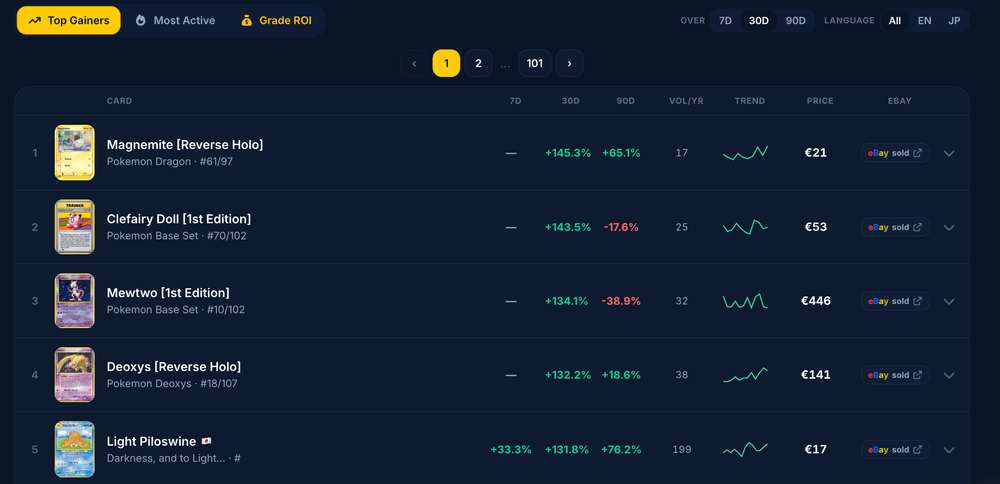
Track the whole market
What's moving, and which cards are worth grading, from our own eBay-sold data.
- Top gainers and most active cards over 7, 30 and 90 days.
- Grade-ROI: which cards return the most graded to PSA 10, with the estimated net profit.
- Every number from real eBay sold listings, refreshed daily, never a third-party estimate.
Supported today
Magic: The Gathering, Yu-Gi-Oh! and TCGplayer on the roadmap.
PokemonOne PieceENITDEFRESJP
Start for free
See the plans, read the FAQ, or get in touch.
